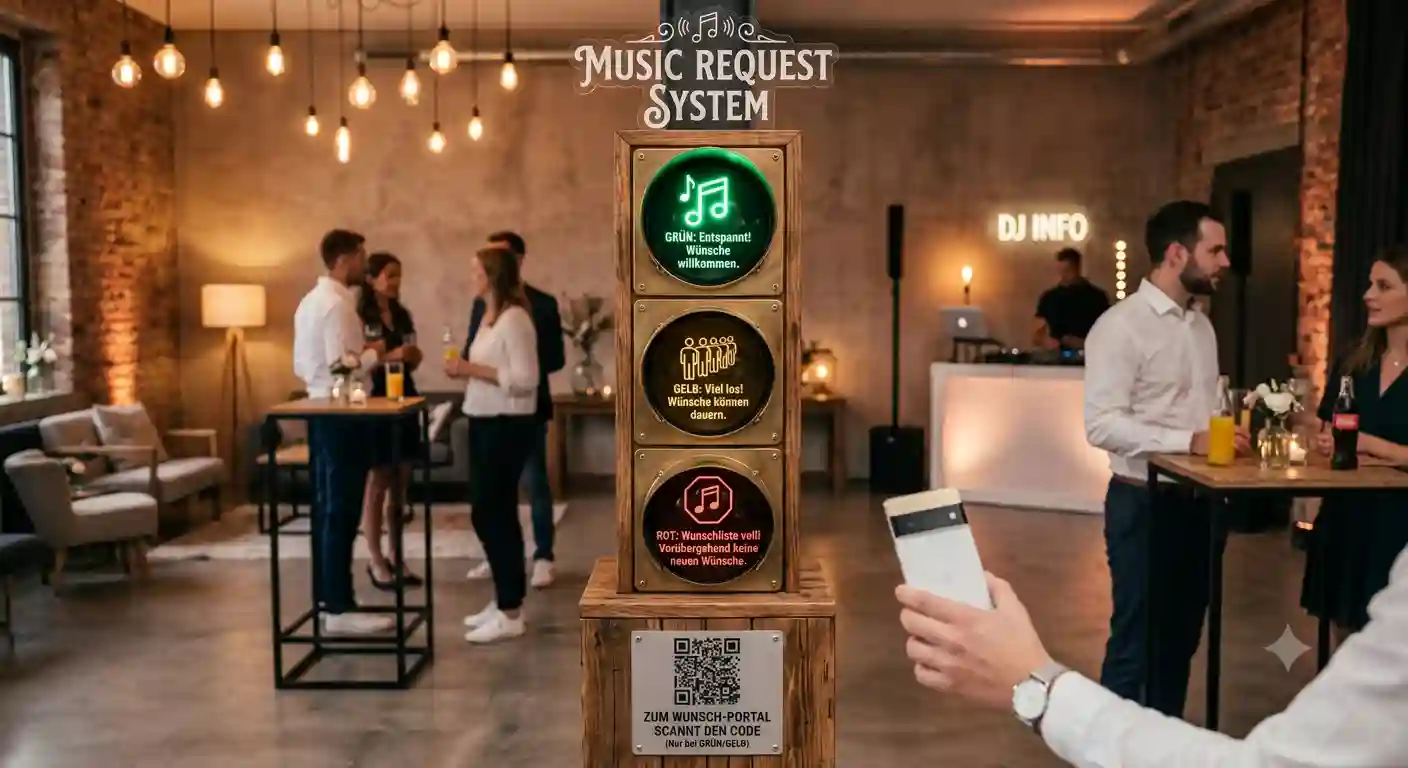
Every DJ knows this moment. The floor is rocking, you're about to nail the transition — and someone taps you on the shoulder. "Can you play something by…?" You nod, you smile, you lose your train of thought. Two songs later, the next one.
Song requests aren't the problem. Losing control is the problem. And it happens whenever requests come at you unfiltered, unmanaged, and face-to-face.
Why Shouts and Scraps of Paper Slow You Down
- They always come at the worst time. Never during the break. Always mid-mix.
- You can't understand half of them. Loud environment, tipsy guests, half-hummed melodies.
- You can't say no. Not to someone's face, not at a wedding, not as a hired professional.
- It never stops. Once someone has asked, they follow up. And send their friends.
- You have no way to prioritize. A pile of scraps doesn't tell you which song will actually get the crowd moving.
The first step is to change the channel: away from shouting, over to song requests via QR code. The second step is the crucial one — you need to be able to turn off the tap.
The Request Traffic Light: Green, Yellow, Red
The request traffic light is a switch on your dashboard that makes the state of your request intake visible to all guests. Three levels:
🟢 Green — All Relaxed
Requests are welcome. The classic state at the start of the evening, when you still have room and want to build the mood.
🟡 Yellow — High Demand
The most honest signal there is. Guests can see: a lot is coming in right now, it might take a while. This lowers expectations without you having to turn anyone away. And it stops the follow-up questions before they start.
🔴 Red — Intake Paused
Requests are on hold. You're running your peak block, your closing, your moment — without new requests trickling in. And without having to say no to anyone's face. The traffic light says it for you.
On top of that, you can freeze intake entirely with a single click. The request traffic light and the pause function are included from the Standard plan.
The Real Trick: The Traffic Light Says No, Not You
This is the whole point, psychologically. If you turn a guest away, you're the bad guy — at a wedding, that's a real problem, because your client is standing right there.
⚠️ Without a traffic light: You say no personally — at a wedding, right in front of the couple. Or you play everything, lose the dance floor, and ultimately your reputation.
✅ With the request traffic light: The light is on red, the guest sees it on their phone, accepts the system state, and goes back to dancing. You remain the likeable DJ who's simply at full capacity right now.
Live Request Status: The End of Follow-Up Questions
The most common question at the booth isn't "Will you play X?" — it's "Is my song still coming?". That's exactly what gets answered automatically from the Standard plan onward.
Your guests see on their own phone right away whether their song:
- has been accepted,
- is scheduled for later,
- doesn't fit right now, or
- has already been played.
No callbacks, no follow-ups, no shoulder-tapping. The guest gets an honest response — and you get your peace.
✅ The end of the most common question: "Is my song still coming?" now answers itself — right on the guest's phone.
The Popularity Counter: Prioritize Instead of Working Through a List
Not every request is equally valuable. When a title is requested multiple times, it appears in your list only once — with a counter next to it, for example 🔥 6×.
This flips the logic: you're not working through a list, you're reading the crowd. Whatever is at the top is what the room wants. You still make the final call — but you decide with data, not gut feeling.
Genre Filter: For Those Who Can't Name a Specific Song
A good portion of annoying requests sound like this: "Play something good." Or: "Something from the 90s." You can't do anything with that — and neither can the guest, really.
With the genre filter (from Standard), you display a separate button that lets guests simply choose a genre — 80s, Rock, Hip-Hop. You get a mood signal instead of a useless wish list. And you keep the song selection entirely in your hands.
Advance Requests: Spread Out the Rush
If you know an event will be request-heavy — wedding, corporate party, community festival — open the request list in advance, protected by a password. A big chunk of requests will come in calmly ahead of time, instead of all hitting at once between 10 and 11 PM.
Your Strategy for the Night
- Before: Open advance requests via password. You don't arrive blind at the gig.
- Warm-up phase: Traffic light on Green. You collect, you read the room.
- Full phase: Traffic light on Yellow. Expectation management before frustration builds.
- Peak & closing: Traffic light on Red or freeze intake. Your set, your rules.
- After: Check the event analytics — what was requested, what worked.
Who Needs This Most
- Wedding DJs: You can't easily say no to the client's guests — the traffic light does it for you. More on this: Wedding DJ: Managing Guest Song Requests with Confidence.
- Club & bar DJs: High volume, loud booth, no time for discussions.
- Mobile DJs: Community events, corporate parties, birthdays, carnival — anywhere everyone wants a say.
- Musicians & bands: You can also turn off requests entirely and just show the tip function.
What It Costs
You can try it out for free with the Free plan — one active event, up to 30 song requests. The request traffic light, the pause function, live status, and genre filter are included from the Standard plan: currently €4 per month (introductory price, regular €6) or €48 per year.
✅ Start for free: The Free plan lets you test the system with zero risk. The request traffic light, live status, and genre filter are included from Standard — for the price of one drink per month.
Made in Germany
DJ Beat & Bite is Made in Germany, runs on German servers, and is GDPR-compliant. Your guests don't need to register and don't download an app — they simply scan and request.
Conclusion
Annoying song requests don't disappear when you ignore them. They disappear when you channel and control them. The QR code moves them away from your shoulder. The traffic light determines when they flow. The live status answers the follow-up questions. And the popularity counter tells you which request will actually fill the dance floor.
You're not a human jukebox. You're the DJ. The system makes sure it stays that way.